Article
Best AI Tools for Long-to-Short Video in 2026
Compare AI tools that turn long YouTube and podcasts into short clips—clip bots vs timeline editors, CapCut hop, and what to check before you pay.

Editor workflow & product
Practical guides for repurposing long video into shorts—written by the team building Short Bytes.
Updated August 7, 2026
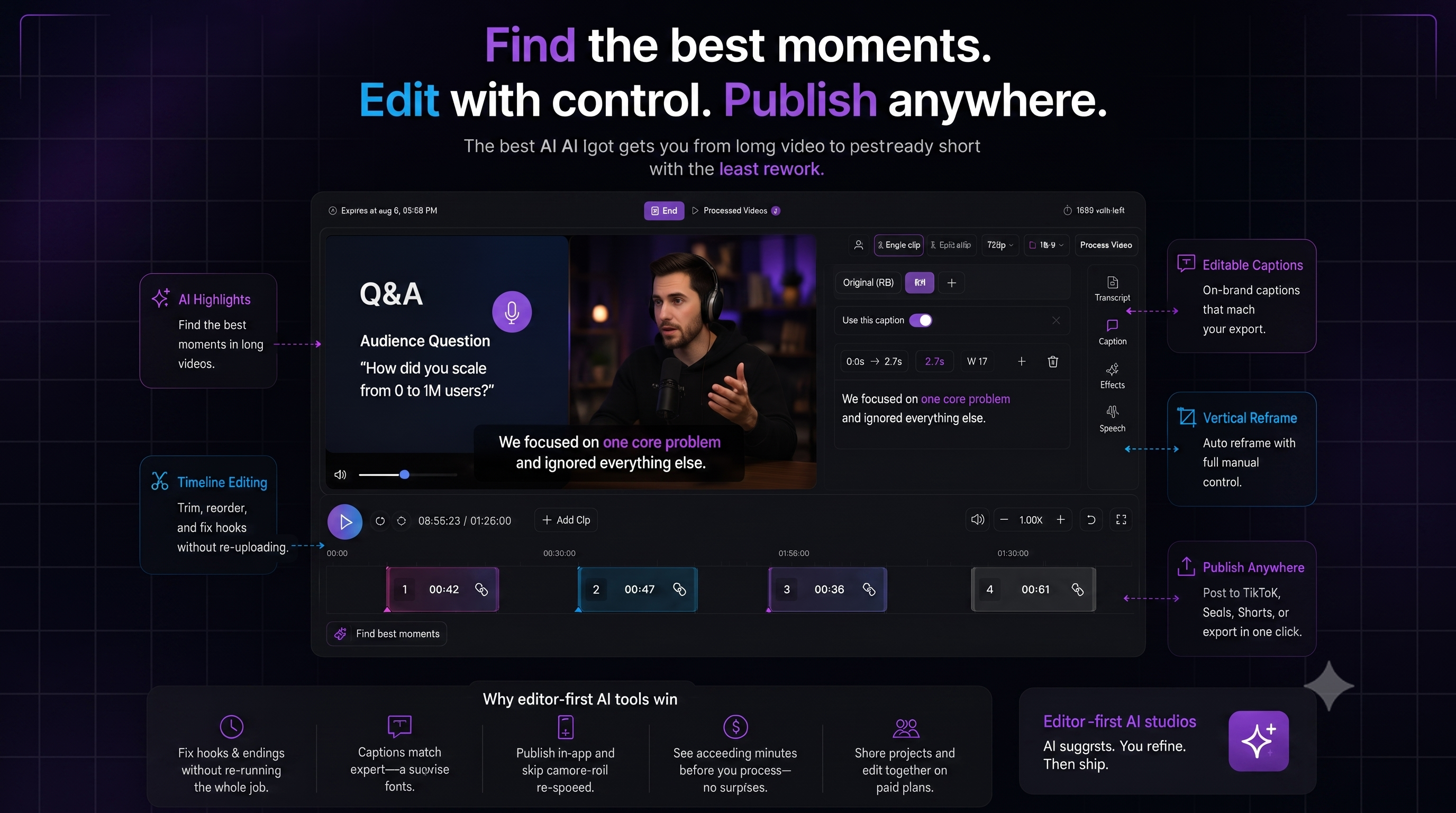
If you searched for long to short video AI or the best AI tools for creating short clips from long videos, you are choosing between three product types—not ten logos.
The best tool is not the one that spits out the most clips. It is the one that gets you to a post-ready short with the least rework—especially if you still hop to CapCut just to fix AI endings.
Quick links if you already know your pain: Opus alternative if you still finish in CapCut · Short Bytes vs Opus Clip · YouTube → TikTok workflow.
What actually matters
| What to check | Why | | --- | --- | | Highlight quality | Ranked moments beat ten random segments | | Timeline editing | Fix hooks and endings without re-running the whole job | | Reframe you can override | Auto-track fails on busy shots | | Captions that match export | No surprise fonts on download | | Publish in-app | Skip camera-roll re-upload | | Minutes before you process | No surprise bills after you hit process | | Team sharing | Paid plans—invite editor on same timeline, not MP4 loops |
Three types of long-to-short AI tools
One-click clip bots — paste a YouTube link, get scored clips fast. Hard to fix bad cuts; many keepers still go to CapCut for endings.
Desktop / mobile editors — full control (CapCut, Premiere). Slow when the source is a 60–90 minute interview.
Editor-first AI studios — AI suggests moments, you refine on a timeline, then ship. Built for the CapCut-hop crowd.
Named tools at a glance (2026)
Honest lanes—not a fake ranking of twenty clones:
| Tool | Best for | Watch-out | | --- | --- | --- | | Opus Clip | Volume of AI-proposed clips | Mid-sentence endings → CapCut hop for many creators | | Klap | Simple YouTube → vertical batch | Fewer levers when AI picks wrong moments | | Vizard | Teams / webinar repurposing | Still a clip-first workflow for solo polish | | Descript | Transcript-native long edit | Heavier than “just ship Shorts” | | CapCut | Free manual polish & trends | Painful as the primary long-source clipper | | Short Bytes | AI propose + timeline finish + publish | Not a one-click “20 viral clips” bot |
Deeper comparisons: vs Opus Clip · vs Klap · vs Vizard · vs CapCut · vs Descript.
The CapCut hop (why lists miss it)
Most “best AI clipping tools” roundups compare bots to bots. The real workflow for interview and education channels is often:
- AI bot proposes clips
- You discard half
- You open CapCut to fix the ending
- You re-export and upload again
If that is you, optimize for finish loop, not raw clip count. That is the wedge behind Short Bytes as an Opus alternative when CapCut is only for endings.
30-second checklist before you pay
- Can I fix the hook and endings without re-uploading—or hopping to CapCut?
- Are captions on-brand and editable?
- Can I post to my main platforms from one place?
- Is processing cost shown before you process?
- Can a teammate edit the same project on paid plans—without export ping-pong?
Editor-first vs clip-bot (quick pick)
| You need… | Lean toward | | --- | --- | | Ten rough clips fast | Clip bot (Opus, Klap) | | One perfect hook + clean ending | Timeline editor (Short Bytes) | | Agency/client revisions | Project sharing on paid plans | | Podcast → weekly Shorts | AI highlights + manual trim |
FAQ
What is the best AI tool for long to short video in 2026?
Depends on the job. For volume of rough clips, use a clip bot. For shorts you will actually post without a second app for endings, use an editor-first timeline tool. CapCut alone is strong for polish, weak as the only long-source clipper.
Can AI create short clips from long YouTube videos automatically?
Yes—most clip bots paste a URL and return candidates. Automatic ≠ post-ready. Plan time to fix hooks, endings, reframe, and captions unless the tool includes a real timeline.
Do I still need CapCut after Opus or Klap?
Many creators do, mainly for mid-sentence endings and light polish. If CapCut is only that hop, a timeline-first tool can replace the second app—see CapCut vs Short Bytes.
Short Bytes vs Opus Clip—who should switch?
Switch (or trial) if you already discard bad AI cuts and finish in CapCut. Stay on Opus-style bots if you only need bulk drafts and do not care about endings. Full table: Short Bytes vs Opus Clip.
Compare tools with a real edit
Sign in free, import a long video, and see if the timeline finish workflow fits you—without the CapCut hop for endings.
See the CapCut-hop pageAlso read: Opus alt if you still use CapCut · Short Bytes vs Opus Clip · CapCut comparison · YouTube → TikTok guide · Team sharing